Livewire Form Objects: Validation Patterns That Scale

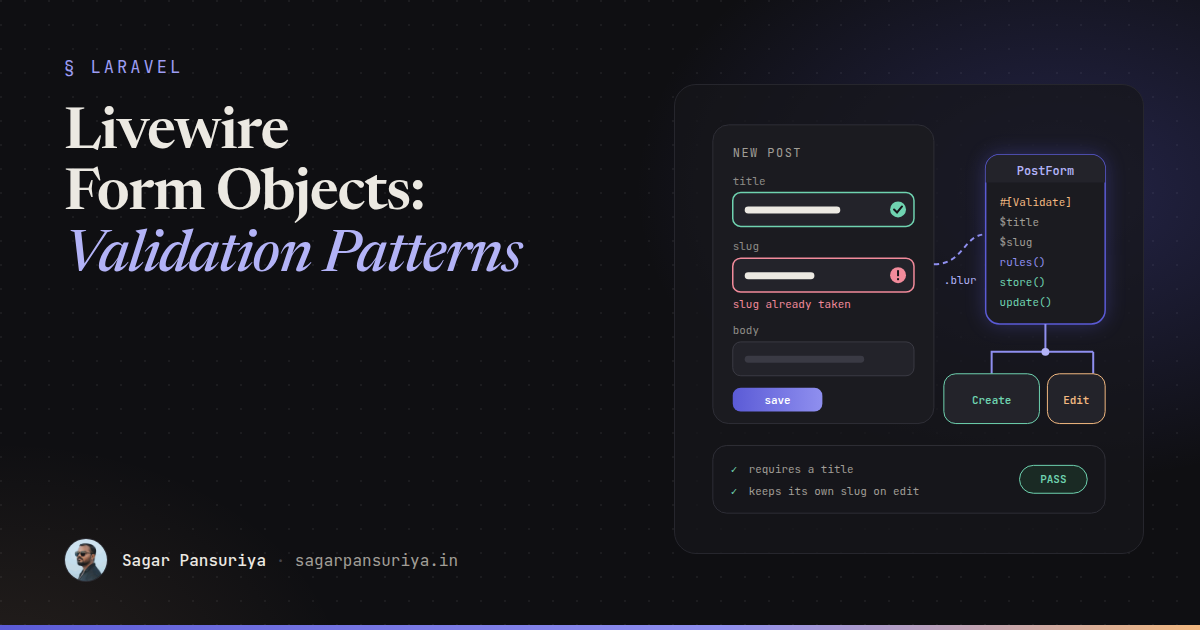
You've probably opened a Livewire component that started life as a simple "create post" form and
grew. Fourteen public properties. A rules() method that scrolls. A mount() that
copies every field from a model, a save() that copies them all back, and a second component
for editing that is the same file with a different name and one extra line.
Livewire 3 has a clean answer for this: form objects. A form object is a class that owns
the fields, the validation and the persistence of one form, and plugs into any component as a single
property. This post covers how I structure them, when to use #[Validate] versus
rules(), real-time validation, sharing one form between create and edit, dependent fields,
file uploads and testing.
Extracting a form object
Livewire ships an Artisan command that scaffolds the class for you:
php artisan livewire:form PostFormThat creates app/Livewire/Forms/PostForm.php, a class extending
Livewire\Form. Move your fields into it, with their rules as attributes:
namespace App\Livewire\Forms;

use Livewire\Attributes\Validate;
use Livewire\Form;

class PostForm extends Form
{
    #[Validate('required|min:5|max:120')]
    public string $title = '';

    #[Validate('required|min:20')]
    public string $body = '';

    #[Validate('required|in:draft,published')]
    public string $status = 'draft';
}
The component shrinks to a property and an action:
namespace App\Livewire;

use App\Livewire\Forms\PostForm;
use Livewire\Component;

class CreatePost extends Component
{
    public PostForm $form;

    public function save()
    {
        $this->form->validate();

        auth()->user()->posts()->create($this->form->all());

        return $this->redirect(route('posts.index'), navigate: true);
    }
}
In Blade, bind to the nested properties and read errors with the same dotted keys:
<form wire:submit="save">
    <input type="text" wire:model="form.title">
    @error('form.title') <p class="text-sm text-red-600">{{ $message }}</p> @enderror

    <textarea wire:model="form.body"></textarea>
    @error('form.body') <p class="text-sm text-red-600">{{ $message }}</p> @enderror

    <button type="submit">Save</button>
</form>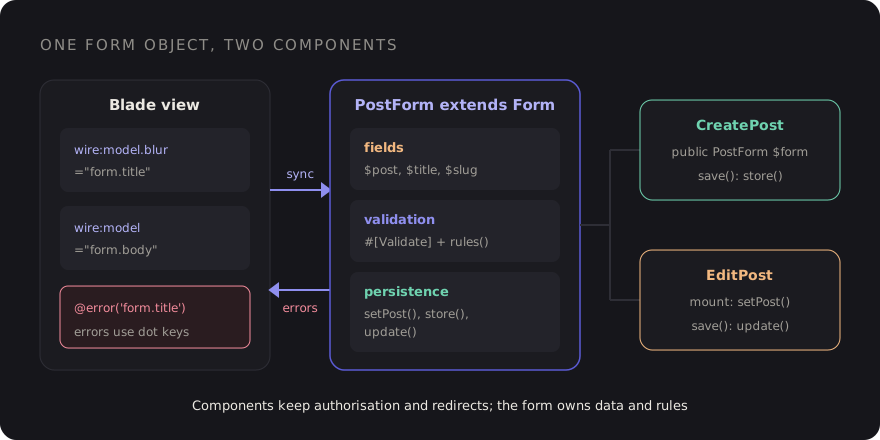
#[Validate] or rules()?
Both work in form objects, and both end up in the same validator. The difference is ergonomics and one important behaviour.
#[Validate]attributes sit right above the property, which is lovely to read. By default they also validate a property as soon as it's updated, which gives you real-time validation for free.- A
rules()method is plain PHP, so it can use rule objects,Rule::unique()->ignore(), closures and conditions. Rules defined here are not run automatically on update; they run when you callvalidate().
My default is attributes for simple string rules and rules() as soon as a field needs a rule
object or depends on state. You can mix them. If you want real-time validation for a property whose rules
live in rules(), the Livewire docs describe adding an empty #[Validate]
attribute to that property to opt it in.
If you want the opposite, a rule on an attribute that only runs on submit, pass
onUpdate: false:
#[Validate('required|email', onUpdate: false)]
public string $email = '';
Real-time validation without hammering the server
Real-time validation is triggered when a property is sent to the server, so the
wire:model modifier decides how often it happens:
| Binding | Validates | Good for |
|---|---|---|
wire:model | With the next action (usually submit) | Short forms |
wire:model.blur | When the user leaves the field | Most forms: feedback without nagging |
wire:model.live.debounce.500ms | After typing pauses | Username or slug availability |
.blur is the sweet spot for most fields. Nobody wants "The title must be at least 5
characters" while they're typing the second character. If you're weighing Livewire's round-trip model
against a client-rendered stack for form-heavy screens, I wrote a decision
framework for Livewire vs Inertia that covers exactly that trade-off.
Custom messages and attribute names
For one-off messages, the attribute takes message and as arguments. The
as name replaces :attribute in the default messages, which fixes the ugly
"form.title" that would otherwise leak into errors:
#[Validate('required', message: 'Give your post a title.')]
#[Validate('min:5', message: 'Titles need at least 5 characters.')]
public string $title = '';

#[Validate('required|date|after:today', as: 'publish date')]
public ?string $publish_at = null;
When a form has more than a couple of these, I move them into methods so they're in one place:
protected function messages(): array
{
    return [
        'title.required' => 'Give your post a title.',
        'body.min'       => 'Write at least a couple of sentences.',
    ];
}

protected function validationAttributes(): array
{
    return ['publish_at' => 'publish date'];
}
One form for create and edit
This is where form objects really pay off. Keep an optional model on the form, a method to load it, and
separate store() and update() methods. Both components reuse everything
else:
use App\Models\Post;
use Illuminate\Validation\Rule;

class PostForm extends Form
{
    public ?Post $post = null;

    public string $title = '';
    public string $slug = '';
    public string $body = '';

    protected function rules(): array
    {
        return [
            'title' => ['required', 'min:5', 'max:120'],
            'slug'  => ['required', 'alpha_dash', Rule::unique('posts', 'slug')->ignore($this->post)],
            'body'  => ['required', 'min:20'],
        ];
    }

    public function setPost(Post $post): void
    {
        $this->post = $post;
        $this->title = $post->title;
        $this->slug  = $post->slug;
        $this->body  = $post->body;
    }

    public function store(): Post
    {
        $this->validate();
        $post = auth()->user()->posts()->create($this->only(['title', 'slug', 'body']));
        $this->reset();

        return $post;
    }

    public function update(): void
    {
        $this->validate();
        $this->post->update($this->only(['title', 'slug', 'body']));
    }
}
class EditPost extends Component
{
public PostForm $form;
public function mount(Post $post)
{
$this->authorize('update', $post);
$this->form->setPost($post);
}
public function save()
{
$this->authorize('update', $this->form->post);
$this->form->update();
session()->flash('status', 'Post updated.');
}
}Note the ignore($this->post) on the unique rule. With null on create it does
nothing, and on edit it lets the post keep its own slug. That single line is the reason this form uses
rules() instead of attributes. Also note that authorisation stays in the component: the form
object handles data, the component decides who's allowed to act on it.
Only the explicit field list goes intocreate()andupdate(). Using$this->all()here would also include the$postproperty, so name the fields and keep mass assignment boring.
Dependent fields
Forms often have fields that only matter when another field has a certain value: a "company name" that's
required only for business accounts, or a region list that depends on the selected country. Picture an
AccountForm used by a CreateAccount component. Handle the rule and the state
separately.
For the rule, conditional validation belongs in rules():
protected function rules(): array
{
    return [
        'account_type' => ['required', 'in:personal,business'],
        'company'      => [Rule::requiredIf($this->account_type === 'business'), 'nullable', 'max:120'],
        'country'      => ['required', 'exists:countries,code'],
        'region'       => ['required', Rule::exists('regions', 'code')->where('country_code', $this->country)],
    ];
}
For the state, reset the dependent field when its parent changes, so a stale region from the previous
country can't be submitted. The component's generic updated() hook receives the full dotted
property name, so this goes in CreateAccount:
public function updated($property): void
{
    if ($property === 'form.country') {
        $this->form->reset('region');
    }
}
In the view, show the dependent field only when it applies. Use wire:model.live on the
parent select, since the UI needs to react right away:
<select wire:model.live="form.account_type">…</select>

@if ($form->account_type === 'business')
    <input type="text" wire:model.blur="form.company">
@endif
File uploads
Uploads work in form objects too. The WithFileUploads trait goes on the component;
the property and its rules can live on the form:
// In the component
use Livewire\WithFileUploads;

class CreatePost extends Component
{
    use WithFileUploads;

    public PostForm $form;
}

// In PostForm
#[Validate('nullable|image|max:2048')]   // kilobytes
public $cover;

public function storeCover(): ?string
{
    return $this->cover?->store('covers', 'public');
}
Livewire uploads the file to a temporary location as soon as it's selected, and the attribute validates it
right away, so users see "must be an image" before they hit save. Use wire:loading with
wire:target="form.cover" to show upload progress, and only move the file to permanent storage
inside your store() or update() after the whole form validates.
Testing forms
Form objects are tested through their components, and Livewire's test helpers use the same dotted keys as the view. With Pest:
use App\Livewire\CreateAccount;
use App\Livewire\CreatePost;
use App\Livewire\EditPost;
use App\Models\Post;
use App\Models\User;
use Livewire\Livewire;

it('requires a title', function () {
    Livewire::actingAs(User::factory()->create())
        ->test(CreatePost::class)
        ->set('form.title', '')
        ->call('save')
        ->assertHasErrors(['form.title' => 'required']);
});

it('lets a post keep its own slug on edit', function () {
    $post = Post::factory()->create(['slug' => 'hello-world']);

    Livewire::actingAs($post->user)
        ->test(EditPost::class, ['post' => $post])
        ->assertSet('form.slug', 'hello-world')
        ->set('form.title', 'Hello again, world')
        ->call('save')
        ->assertHasNoErrors();

    expect($post->fresh()->title)->toBe('Hello again, world');
});

it('clears the region when the country changes', function () {
    Livewire::actingAs(User::factory()->create())
        ->test(CreateAccount::class)
        ->set('form.region', 'GJ')
        ->set('form.country', 'US')
        ->assertSet('form.region', '');
});
These tests are fast and cover the rules and the state logic. For the parts that only exist in a browser, like focus, the loading state and whether the dependent field actually appears, add a few Pest browser tests on top.
A checklist for Livewire forms
- Any form with more than three or four fields gets a form object.
- Attributes for simple rules;
rules()for rule objects, uniqueness and conditions. wire:model.blurfor most fields,.liveonly when the UI must react immediately.- Use
asorvalidationAttributes()so "form.title" never reaches a user. - One form class for create and edit:
setPost(),store(),update(). - Authorisation stays in the component, not the form object.
- Reset dependent fields when their parent changes.
- Save uploads to permanent storage only after the whole form validates.
- Test with
set('form.*')andassertHasErrorsfor every rule that matters.
The component that started this post, with fourteen properties and a twin for editing, becomes one form class and two components of a dozen lines each. More importantly, the next field you add goes in exactly one place.
Discussion